To start production, you first need to define a BOM for the product.
Step 1: Create a New BOM
Navigate to the Bill of Materials tab and click New.

Select the Finished Product you want to manufacture.
Step 2: Add BOM lines (Materials)
Navigate to the BOM lines and click New.
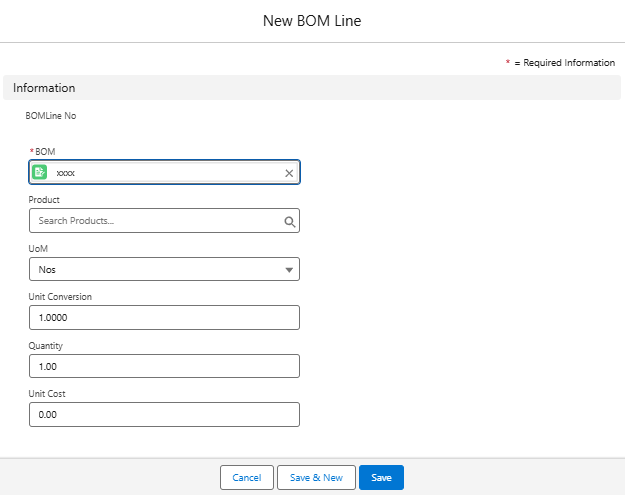
Add raw materials and their required quantities.
Step 3: Costing
The system automatically calculates BOM cost based on raw material and operation costs.
Review the calculated cost and compare with selling price.
Save the BOM.
Step 4: Versioning
If product design changes, create a new BOM version instead of editing the original.
Reports & Tracking
BOM Register – lists all BOMs created for products.
BOM Cost Report – compares standard vs actual costs.
Best Practices
Always create a separate BOM for each product variant.
Use versioning for revisions to maintain history.
Validate material availability before finalizing.
You can also perform the following actions on existing BOM:
Edit BOM
Go to BOM, select a BOM, click Edit, update the details, then click Save.
Clone BOM
Select a BOM, click Clone, make changes, then click Save.
Delete BOM
Select a BOM, click Delete Selected or open a BOM and click Delete.
Next Step
After creating a BOM, you can generate a Work Order to begin manufacturing.
Was this article helpful?
That’s Great!
Thank you for your feedback
Sorry! We couldn't be helpful
Thank you for your feedback
Feedback sent
We appreciate your effort and will try to fix the article