To create new manual journal:
- Go to the Manual Journals tab.
- Click New.
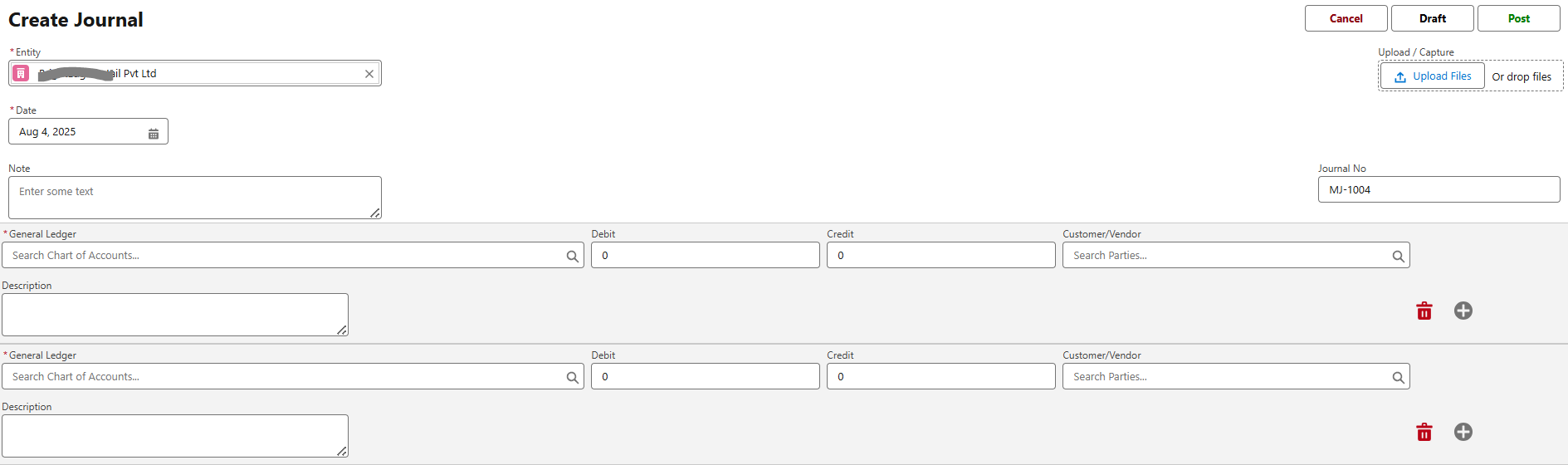
- Fill in:
- Date, Journal No, Note
- Add line items for GL Account, Debit/Credit Amount, Customer/Vendor, Description
- Click Save and then Post if ready.
Total Debits must equal Total Credits.
You can also perform the following actions on existing records:
Reverse Manual Journals:
Reverse an existing manual journal by selecting it, clicking Reverse, making necessary edits, and saving it as Draft or Post.
View Journal:
Access the details of a recorded manual journal by selecting it and clicking View Journal on the details page.
View and Edit Journal Lines:
Inspect or modify specific journal lines by selecting the journal, clicking the action icon beside a line, and choosing
Edit or Delete.
Edit Manual Journal:
Update an existing manual journal by clicking Edit, making necessary changes, and clicking Save.
Clone Manual Journal:
Use the Clone option to duplicate a manual journal, modify details, and save it as Draft or Post.
Delete Manual Journal:
Remove a manual journal by selecting it and clicking the Delete icon, then confirming the deletion.
Make Manual Journal Recurring:
Turn a manual journal into a recurring entry by selecting frequency and end date via the Make Recurring option.
Void Manual Journal:
Use the Void button to cancel a posted manual journal entry without deleting it, preserving its audit trail and ensuring financial accuracy.
Attach Files to Manual Journal:
Attach files to a journal by clicking Upload Files or simply dragging and dropping them into the ‘Notes & Attachments’ section.
Was this article helpful?
That’s Great!
Thank you for your feedback
Sorry! We couldn't be helpful
Thank you for your feedback
Feedback sent
We appreciate your effort and will try to fix the article