The AI Agent module allows users to configure an AI-powered assistant within the accounting app to automate key finance tasks like invoice routing, report generation, and contextual support.
Accessing the AI Agent Tab
Navigate to the AI Agent tab from the main navigation menu.
Click New to create a new AI Agent.
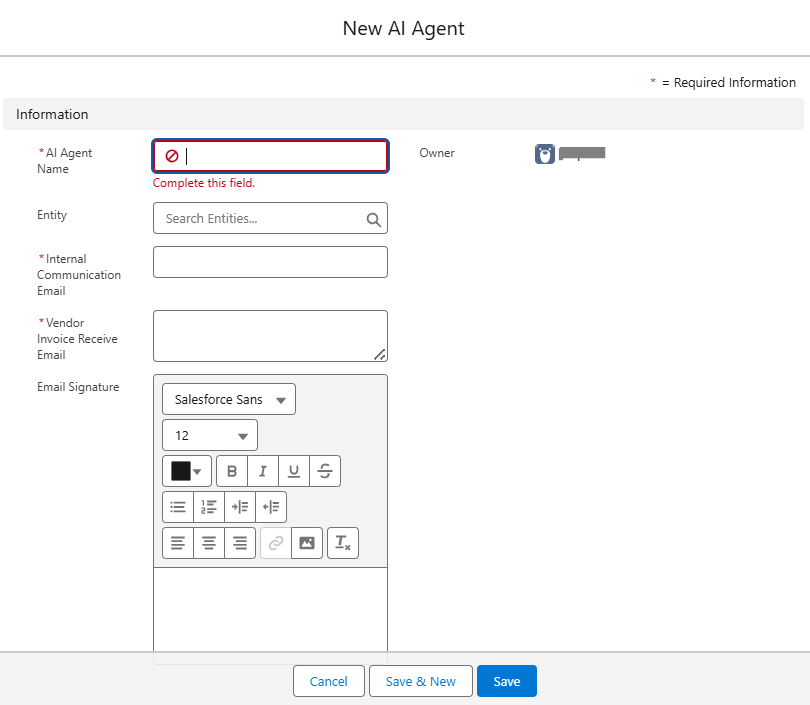
Fill in the required details and Click Save.
| Field | Description |
|---|---|
| AI Agent Name | A unique, meaningful name for your AI agent (e.g., InvoiceBot, PayablesHelper) |
| Entity | Search and associate the AI agent with a specific business entity within your organization |
| Internal Communication Email | Email used by the AI agent to send internal updates or escalations |
| Vendor Invoice Receive Email | Email where the AI agent receives vendor invoices for processing |
| Email Signature | Signature used in outgoing emails from the AI agent. You can format it using the rich text editor. |
Notes:
Make sure the provided emails are active and monitored.
The AI agent will begin functioning based on the roles and workflows configured post-setup.
Was this article helpful?
That’s Great!
Thank you for your feedback
Sorry! We couldn't be helpful
Thank you for your feedback
Feedback sent
We appreciate your effort and will try to fix the article