To create a new chart of account:
- Go to Chart of Accounts → Click New.
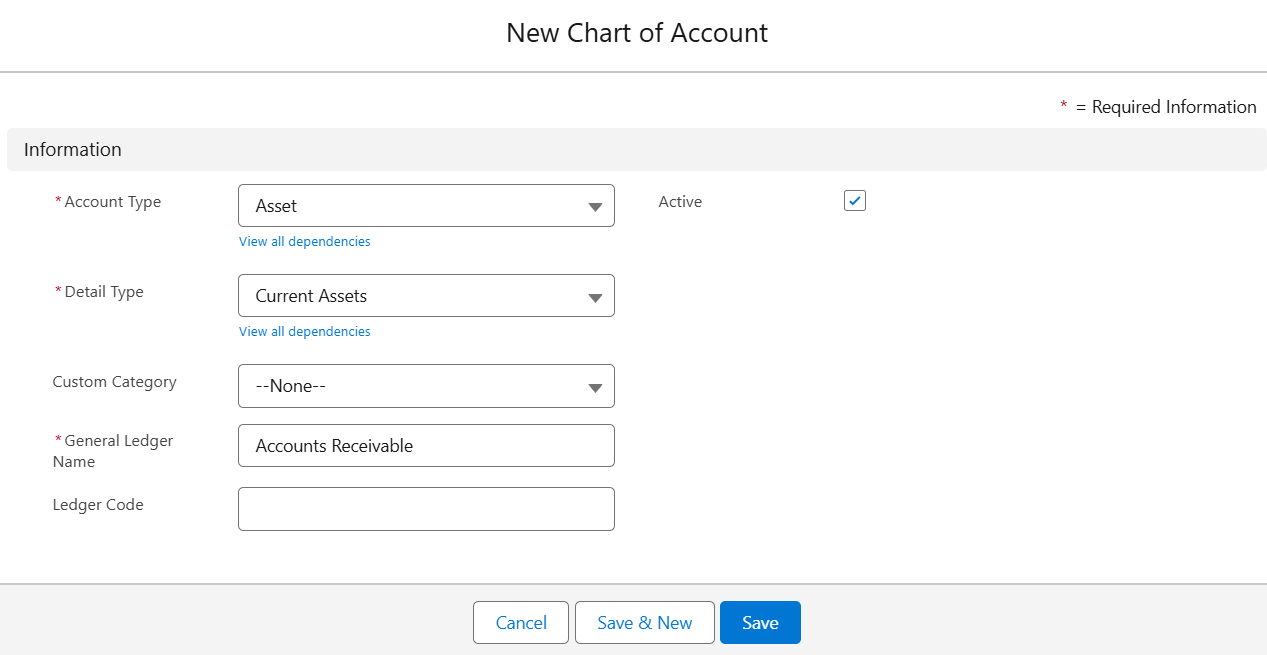
- Fill in: Account Type, Detail Type, GL Name, Ledger Code, Entity
- Click Save.
You can also perform the following actions on existing records:
Edit Account
Go to Chart of Accounts, select an account, click Edit, update the details, and click Save.
Clone Account
Select an account, click Clone, update the necessary fields in the popup, and click Save.
Delete Account
For a single account, open it, click Delete, and confirm. For multiple accounts, select the checkboxes and click
Delete Selected.
Note: Accounts with linked transactions must be cleared or reassigned first.
Mark as Inactive
Open the account, uncheck Active, and click Save. Inactive accounts won’t appear in new transactions but remain in records.
Was this article helpful?
That’s Great!
Thank you for your feedback
Sorry! We couldn't be helpful
Thank you for your feedback
Feedback sent
We appreciate your effort and will try to fix the article