When a purchase order (PO) is created and approved, the next step is to record the receipt of goods into the warehouse. The system provides two ways to receive goods against a purchase order.
Method 1: Receive from Purchase Order
Open the purchase order (PO) that you want to process.
Click on Receive.
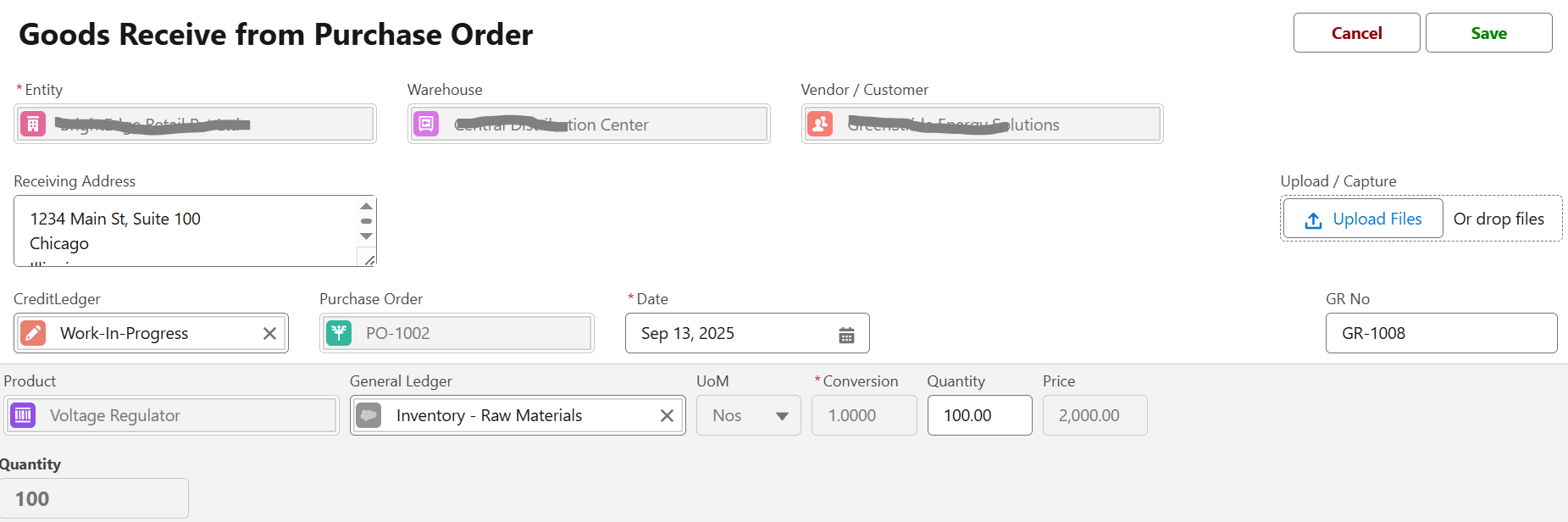
This will automatically open the Goods Receive page.
Entity, Warehouse, Vendor/Customer, and Receiving Address are pre-filled.
PO items are auto-loaded with product, quantity, and price details.
Edit the details if needed (e.g., quantity received).
Save the transaction.
The goods will be updated in the selected warehouse.
The system automatically links this goods receipt to the original PO.
Method 2: Create Goods Receive Manually
Navigate to Inventory → Goods Receive.
Create a new Goods Receive record and choose the party (Vendor / Customer)
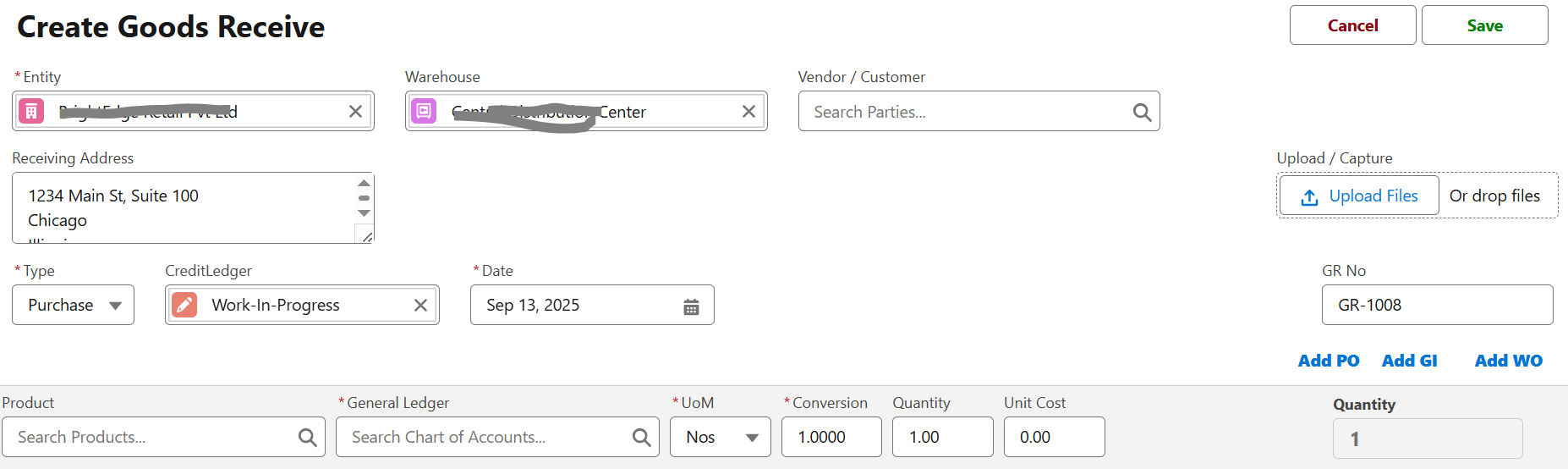
Select Type = Purchase.
Click Add PO.
This will display the list of outstanding purchase orders for the selected party.
Choose the desired PO.
The system will automatically pull in the PO details (entity, warehouse, vendor, and receiving address).
All pending items from the PO will be listed.
Enter the quantity received (full or partial). You can also add additional items if any.
Verify or edit the general ledger, unit cost, and price details if needed.
Save the record.
The goods will be updated in the warehouse inventory.
The PO status will be updated based on received quantities.
Key Notes
Partial Receipts: You can enter a lower quantity if only part of the PO is received. The balance remains open.
Over Receipts: The system may allow or restrict receiving more than ordered, depending on configuration.
Ledger Impact: Goods Receive updates both the Inventory (Raw Materials/Finished Goods) account and the Credit Ledger as defined in the PO.
Quick One-Liner:
“Goods Receive can be created directly from the Purchase Order or manually by linking the PO while creating a Goods Receive transaction.”
Reports & Tracking
Pending Deliveries Report – Shows POs awaiting goods receipt.
Goods Receipt Register – Tracks all GRs created, by vendor or warehouse.
Stock Inflow Dashboard – Highlights recent receipts and replenishments.
Best Practices
Always verify physical stock before creating a GR.
Use batch/serial tracking for products with shelf life or traceability needs.
Record partial receipts on the same day to maintain inventory accuracy.
Reconcile GRs regularly with vendor bills for error-free accounting.
Next Step
After goods are received, the next stage is Vendor Bills and Payments, where invoices are recorded and matched against POs and GRs.
Was this article helpful?
That’s Great!
Thank you for your feedback
Sorry! We couldn't be helpful
Thank you for your feedback
Feedback sent
We appreciate your effort and will try to fix the article