The Dashboard in the Accounting App provides a real-time, interactive snapshot of your organization's financial health. It offers visual insights into key financial metrics to help you make quick, informed decisions.
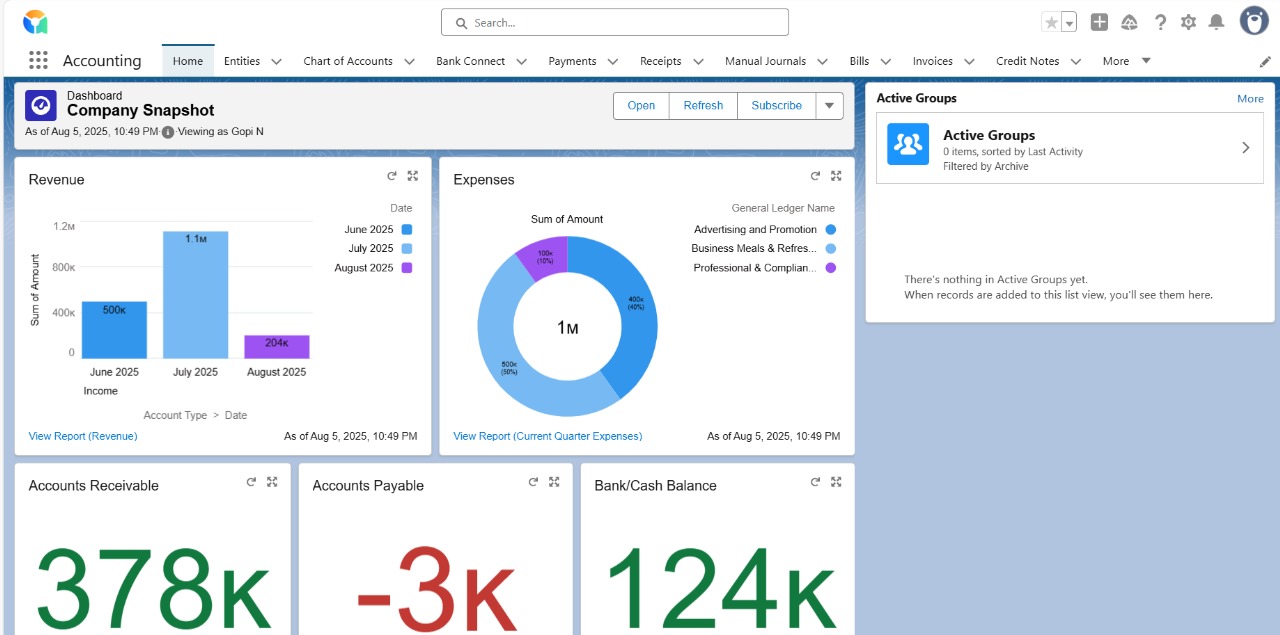
Default Setup
An Accounting Dashboard is automatically created when the Accounting App is installed.
By default, the dashboard is empty. Admins or users with permission must populate it with widgets by editing.
Add Widgets
To build your dashboard:
Click Add Widget
Choose from:
Chart/Table: Link existing reports
Text: Add contextual information or notes
Image: Upload logos, diagrams, etc.
Add Filters
Use Filters to dynamically refine data across multiple widgets.
Example: Filter all widgets by Fiscal Year, Company, or Cost Center.
Download, Subscribe & Share
Download as image
Schedule dashboard snapshots to be emailed at set intervals
Share the dashboard link
Was this article helpful?
That’s Great!
Thank you for your feedback
Sorry! We couldn't be helpful
Thank you for your feedback
Feedback sent
We appreciate your effort and will try to fix the article